If you added clients/provider appointments shortcode on any page and you want to show the page only to customer/provider, follow these steps:
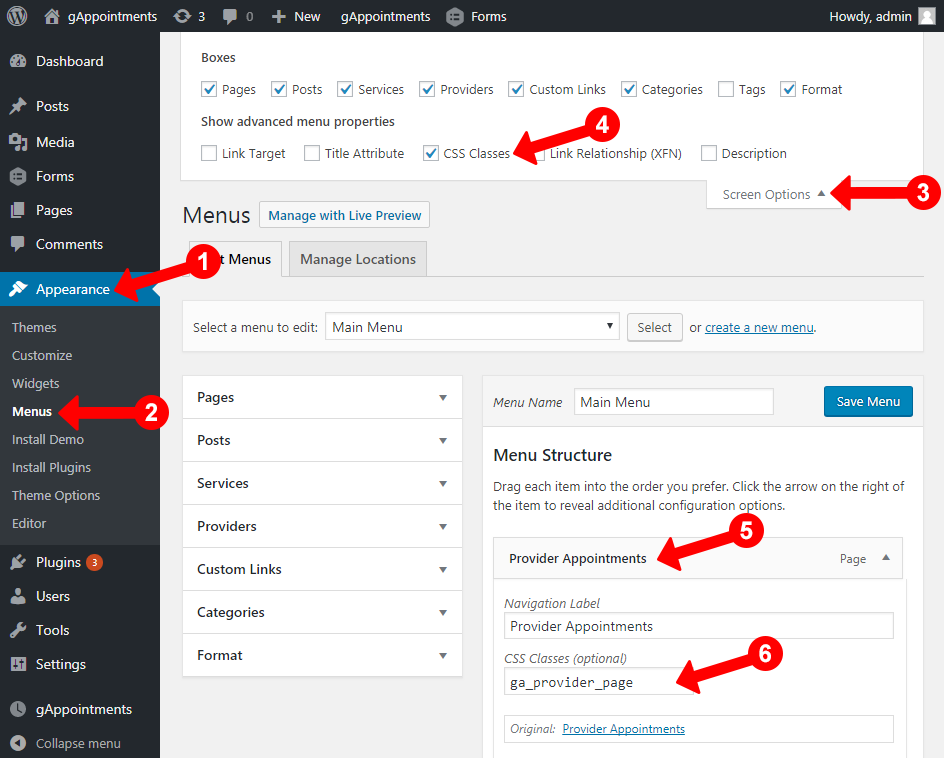
Step 1. Go to Appearance
Step 2. Go to Menus
Step 3. Click Screen Options on top right admin
Step 4. Check CSS Classes to enable menu item CSS Classes
Step 5. Find the clients/providers page
Step 6. Add class “ga_customer_page” or “ga_provider_page”
The way it works, if a user is logged and is a client or a provider those pages will be visible only to them in the navigation.